 Photo by Immo Wegmann on Unsplash
You type "what are the best project management tools for a remote team?" into ChatGPT. A few seconds later, it gives you a neat, cited answer with bullet points and comparisons. It feels like it just Googled your question. But that is not what happened. Not even close.
What actually happened involved a classifier model, a query decomposition step, somewhere between three and seven separate search queries fired off to Bing, dozens of pages fetched and read in sliding windows, passage extraction, relevance scoring, and finally a synthesis step that stitches everything together into a coherent answer.
I have spent the last few months reverse-engineering this pipeline — partly out of curiosity, partly because understanding it is essential if you want your content to show up in AI-generated answers. Here is everything I have found.
Step 1: The Search Classifier
Before any searching happens, ChatGPT runs your prompt through a lightweight classifier model. This is a fast binary decision: does this question need web search, or can I answer it from my training data alone?
Questions that almost always trigger search:
- Anything with "latest," "best," "2026," or other time-sensitive markers
- Comparison queries ("X vs Y")
- Fact-checking prompts ("is it true that...")
- Questions about current events, prices, or availability
Questions that usually skip search:
- General knowledge ("what is photosynthesis")
- Math and logic problems
- Creative writing tasks
- Coding questions about well-established languages and frameworks
The classifier is not perfect. I have seen it skip search on questions that clearly needed fresh data, and I have seen it trigger search on evergreen topics where the training data would have been fine. But it is right most of the time, and it is fast — the decision takes milliseconds.
Here is the important bit: if your content targets queries that never trigger the search classifier, AI search optimization is irrelevant for you. The model will just answer from memory. The content that matters for AI search is the content that answers time-sensitive, comparative, or fact-specific questions.
Step 2: Query Decomposition (The Fan-Out)
This is where it gets interesting, and where most people's mental model breaks down.
ChatGPT does not take your question and search for it verbatim. Instead, a query decomposition step breaks your single question into multiple targeted sub-queries. Think of it like a research assistant who, when asked a broad question, instinctively knows they need to search for several specific things to give you a complete answer.
Take our example: "best project management tools for a remote team."
That single prompt might decompose into something like:
- "project management software comparison 2026"
- "best free PM tools for small teams"
- "Asana vs Monday vs ClickUp features"
- "project management tools remote team collaboration"
- "top rated project management software reviews"
That is five separate searches. Five sets of results. Five different SERPs worth of pages to read.
The number of sub-queries varies by question type. From what I have observed:
- Simple factual questions: 1-2 sub-queries ("when was the Eiffel Tower built" might just be one)
- How-to questions: 2-4 sub-queries
- Comparison questions: 5-7 sub-queries (these generate the most)
- Research questions: 3-5 sub-queries
- "Best of" lists: 4-6 sub-queries
Comparison queries are the heavy hitters. When you ask ChatGPT to compare three products, it is not running one search — it is running searches for each product individually, plus comparative searches, plus review-aggregation searches. That is why comparison answers tend to be the most detailed and the most heavily cited.
Step 3: The Bing Search Layer
Each sub-query gets sent to Bing. This is the Microsoft partnership at work — ChatGPT uses Bing's search index, not Google's. This matters more than people realize.
Bing and Google do not return the same results. Their ranking algorithms weight different signals. Bing tends to favor:
- Exact keyword matches more heavily than Google
- Domain authority from established sites
- Structured data and schema markup
- Content freshness (Bing's freshness signals differ from Google's)
So if you have been optimizing exclusively for Google, you might be invisible in ChatGPT's search results. I have seen sites that rank on page one of Google barely show up in Bing, and vice versa. It is worth checking your Bing rankings separately.
Each sub-query returns roughly 10 results — standard SERP depth. So for a five-sub-query fan-out, ChatGPT is looking at approximately 50 URLs. It does not read all of them. But it has 50 candidates to choose from.
Step 4: The Sliding Window Reader
Here is where computation meets content. ChatGPT cannot read an entire web page at once in the way you or I would scroll through it. Instead, it uses a sliding window approach.
The model fetches a page and reads it in chunks of roughly 5,000 tokens — that is about 3,500 to 4,000 words. For a typical 2,000-word blog post, that might be the whole page in one or two windows. For a longer page, it slides through in multiple passes.
During each window, the model is looking for passages that are relevant to the original question (not just the sub-query). It extracts these passages, scores them for relevance, and stores them for the synthesis step.
This has real implications for content structure:
Front-loading matters. If your key information is buried at the bottom of a 5,000-word article, the model might extract its relevant passages from earlier windows and move on before reaching your best content.
Headings act as navigation signals. The sliding window reader uses headings to decide which sections are worth reading closely. A heading that directly mirrors a likely sub-query ("Asana vs Monday: Feature Comparison") is a strong signal.
Concise answers get extracted more reliably. A tight two-sentence answer to a question is easier for the model to extract than the same information spread across four paragraphs.
Step 5: What Gets Cited (and What Gets Ignored)
Not all content formats are created equal in this pipeline. After spending time analyzing which pages get cited in ChatGPT's answers, some clear patterns emerge.
Tables get cited disproportionately often. A comparison table with features, pricing, and ratings in structured rows is exactly what the model needs for comparison queries. It can extract the whole table, parse it, and synthesize it into its answer. I would estimate tables get cited 3-4x more often than equivalent information in paragraph form.
FAQ sections perform extremely well. A question-and-answer format maps directly to the sub-query structure. If the model's sub-query is "does Asana have a free tier?" and your FAQ has a heading that says "Does Asana have a free tier?" with a concise answer below it — that is an almost guaranteed citation.
Lists with specific numbers outperform vague claims. "Asana's free plan supports up to 10 users and 100 projects" gets cited. "Asana has a generous free plan" does not.
Paragraphs of narrative text are the weakest format. They are harder for the model to extract discrete facts from, and they take up more of the token window for less information density.
Step 6: Synthesis and Citation
The final step is where the model takes all the extracted passages from all the sub-queries and synthesizes them into a single answer. This is a genuine reasoning step — the model is not just stitching quotes together. It is:
- Resolving conflicts between sources (if one page says Product X costs $10/month and another says $12/month, it has to decide or present both)
- Organizing information in a logical structure
- Deciding what to cite and what to present as general knowledge
- Generating the actual response text
Citations in ChatGPT's web search mode are not randomly assigned. The model cites sources for specific claims, and it tends to cite the source from which it most directly extracted that claim. If three pages all mention the same fact, the one with the clearest, most quotable phrasing tends to win the citation.
Why This Matters for Your Content Strategy
Understanding the fan-out pipeline changes how you think about content optimization for AI search. It is not about stuffing keywords or gaming a single ranking algorithm. It is about structuring your content so that it answers the sub-queries the model is likely to generate.
Think about it this way: for any broad topic you are writing about, ask yourself — if a research assistant were breaking this question into five smaller questions, what would those questions be? Then make sure your content clearly answers each one.
Use tables for comparisons. Use FAQ sections for common questions. Put specific numbers and dates in your content. Front-load your key points. Make your headings mirror the questions people actually ask.
And most importantly, do not optimize for just one search engine. If you are invisible on Bing, you are invisible to ChatGPT.
Simulating the Fan-Out Yourself
The most powerful thing you can do is actually run this process yourself. Do not guess what sub-queries ChatGPT will generate — test it. Ask ChatGPT your target question, watch what citations appear, and reverse-engineer what it searched for.
Better yet, link.sc's Search API lets you simulate this fan-out pattern programmatically. You can run the same sub-queries an LLM would — "project management software comparison 2026," "Asana vs Monday features," "best free PM tools" — and see exactly what results come back from real search engines. You will see which pages rank for each sub-query, which ones overlap across multiple sub-queries (those are the ones most likely to get cited), and where your own content stands.
The Research Agent in the link.sc playground takes this a step further. It actually executes the full fan-out pipeline in front of you — decomposing a question into sub-queries, searching for each one, fetching pages, and synthesizing an answer. Watching it work is the fastest way to build intuition for how AI search really operates.
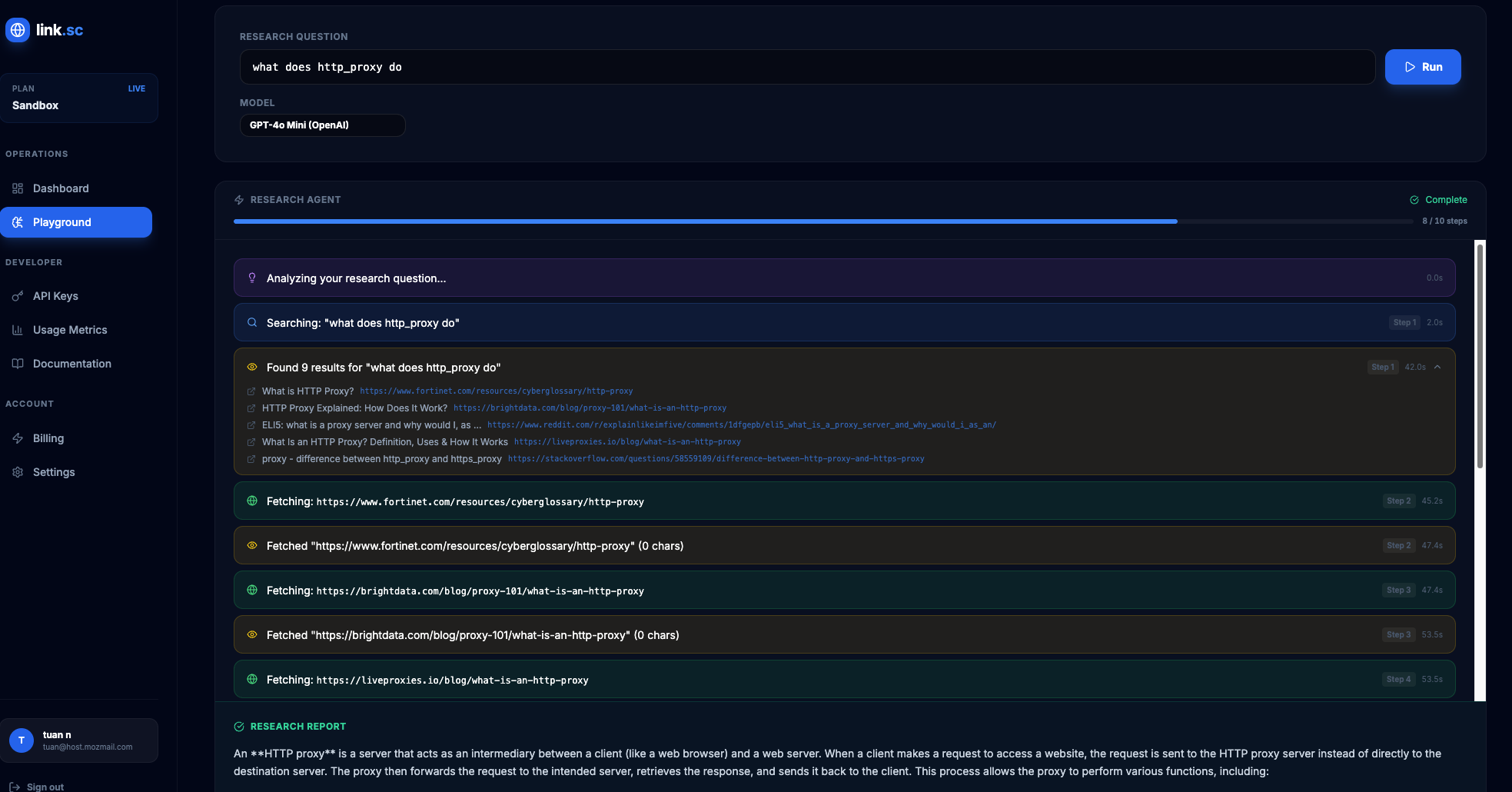 The link.sc Research Agent shows every query, fetch, and decision an LLM makes while searching the web.
The Uncomfortable Truth
I should be honest about what we do not know. OpenAI has not published the full technical spec of their search pipeline. What I have described here is based on observable behavior, public statements from OpenAI and Microsoft, and systematic testing. The exact number of sub-queries, the precise token window size, and the internal scoring mechanisms are approximations.
The pipeline is also changing constantly. OpenAI ships updates to ChatGPT's search capabilities regularly, and what works today might work differently in three months. The structural principles — fan-out query decomposition, passage extraction, citation preference for structured content — are likely to remain stable even as implementation details shift.
But the core insight is durable: AI search is not keyword matching. It is a multi-step research process that decomposes questions, reads pages in chunks, and prefers content that is structured, specific, and directly answerable. Write for that process, and you will be in a better position than most.
Want to see how AI searches the web in real-time? Try the link.sc Research Agent — watch every query, every page fetched, every decision the LLM makes. Get started free.