 Photo by Markus Spiske on Unsplash
Here is something that bothers me about AI search tools: they give you an answer, they cite some sources, but they never really tell you what they searched for to get there.
Ask ChatGPT a question with browsing enabled, and it might run three, five, even ten sub-queries behind the scenes before synthesizing a response. Perplexity does the same thing. Google AI Overviews pulls from its index in ways we can only guess at. As someone building tools in this space, I find the opacity frustrating. If you are doing SEO, content marketing, or building AI-powered applications, you probably do too.
Understanding what these tools actually search for is not just an academic curiosity. It is the difference between optimizing your content for real AI behavior versus guessing. So I spent some time cataloging every method I know of — from quick browser hacks to building your own monitoring system — and I am sharing all of it here.
Why This Matters More Than You Think
When ChatGPT searches the web, it does not just take your question and paste it into Bing. It rewrites your query. Often multiple times. A single user question like "best project management tools for remote teams" might become three or four distinct sub-queries:
- "project management software remote teams 2026 comparison"
- "Asana vs Monday.com vs ClickUp features"
- "remote team collaboration tools reviews"
- "best project management tools pricing plans"
This "fan-out" pattern is how AI search tools get comprehensive answers. But here is the thing: if you are trying to rank for AI search, you need to know what those sub-queries look like. Optimizing for the user's original question is only part of the puzzle. You also need to appear in results for the reformulated queries that the AI actually runs.
The same logic applies if you are building AI applications. Understanding how these tools decompose questions helps you design better search strategies of your own.
Method 1: Chrome Extensions That Capture Sub-Queries
The simplest approach for ChatGPT specifically is a Chrome extension that intercepts the network requests happening behind the scenes.
Tools like "ChatGPT Query Insight" work by monitoring the browser's network activity while you use ChatGPT. When ChatGPT's browsing feature fires off a search, the extension captures the actual query sent to Bing's API and displays it for you.
How they work: These extensions hook into Chrome's webRequest API. They set up listeners that filter for requests going to Bing's search endpoints (since ChatGPT uses Bing under the hood). When they spot a search request, they parse out the query parameter and log it.
What you get: The actual search queries, timestamps, and sometimes the raw API responses including which results were returned.
The limitations are real, though:
- They only work for ChatGPT in the browser. Not the mobile app, not the API, not any other tool.
- They depend on ChatGPT's internal implementation, which changes without notice. An extension that works today might break tomorrow if OpenAI changes how they make search requests.
- You only see your own searches. There is no way to see what queries ChatGPT runs for other users or for different phrasings of the same question.
- Privacy extensions and corporate firewalls can interfere.
Still, if all you want is a quick peek at what ChatGPT does when you ask it something, this is the lowest-effort approach.
Method 2: The DIY Network Inspection Approach
You do not actually need an extension. Your browser's built-in DevTools can show you the same information, plus more.
Here is how to do it with ChatGPT:
- Open ChatGPT in your browser.
- Open DevTools (F12 or right-click and select "Inspect").
- Go to the Network tab.
- Clear existing requests, then ask ChatGPT a question that will trigger web browsing.
- Watch the network requests flow in. Filter by "Fetch/XHR" to reduce noise.
- Look for requests going to search-related endpoints. You will see the query parameters in the request URL or payload.
For the more technically inclined, you can filter by domain. ChatGPT's search requests typically go through specific Bing API endpoints. Look for requests containing bing or search in the URL.
The same technique works for Perplexity, though Perplexity's architecture is different. Their search requests are more opaque in the network tab because they route through their own backend rather than making client-side API calls. You will see requests to Perplexity's own servers, but the actual search queries are embedded in server-side processing that you cannot inspect from the browser.
A word of honesty: this method is fragile. These tools use server-sent events (SSE) and streaming responses, so the data you are looking for might be split across multiple network events. It is also entirely possible that the search queries are generated and executed server-side, in which case you will only see the final streamed response, not the intermediate search steps.
Method 3: What Perplexity and Google Actually Show You
Perplexity is more transparent than ChatGPT in some ways. It shows a Sources panel alongside every answer, listing the web pages it referenced. Some versions of Perplexity also show a brief "Searching for..." indicator that flashes the query terms it is using.
But there is a gap between what Perplexity shows and what it actually does. The Sources panel tells you which pages were cited, but not necessarily all the pages that were fetched. And the search indicator, when it appears, might only show the primary query — not the follow-up sub-queries that refined the results.
Google AI Overviews are the most opaque of all. There is no official way to see what sub-queries or retrieval steps Google's AI uses to generate an overview. You can sometimes infer the search strategy by examining the sources cited and reverse-engineering what queries would return those specific results. But that is guesswork, not monitoring.
The information asymmetry here is a real problem. Google knows exactly what content it is pulling from, and content creators are left to speculate about why they are or are not being cited.
Method 4: The Enterprise / API Approach
If you are working at scale — running an SEO agency, building a content strategy for a large site, or developing AI features — browser-based monitoring is not going to cut it.
A more systematic approach is to use search APIs to simulate the fan-out pattern programmatically. The idea is straightforward: take a user question, generate the same kinds of sub-queries an AI tool would generate, run those queries through a search API, and compare the results to what the AI tool actually cites.
Here is a basic simulation using link.sc's Search API:
# Start with the user's original question
# Then simulate the sub-queries ChatGPT might generate

# Sub-query 1: Direct reformulation
curl -X POST https://api.link.sc/v1/search \
  -H "x-api-key: lsc_..." \
  -H "Content-Type: application/json" \
  -d '{"q": "project management software comparison 2026"}'

# Sub-query 2: Specific feature comparison
curl -X POST https://api.link.sc/v1/search \
  -H "x-api-key: lsc_..." \
  -H "Content-Type: application/json" \
  -d '{"q": "Asana vs Monday.com vs ClickUp features pricing"}'

# Sub-query 3: Review-focused query
curl -X POST https://api.link.sc/v1/search \
  -H "x-api-key: lsc_..." \
  -H "Content-Type: application/json" \
  -d '{"q": "best project management tools remote teams reviews 2026"}'
Each of these returns structured search results — titles, URLs, snippets — that you can compare against what ChatGPT or Perplexity cited in their answers. If there is significant overlap, you have a decent model of their search behavior.
You can take this further with a simple script that automates the comparison:
import requests
import json

API_KEY = "lsc_..."
BASE_URL = "https://api.link.sc/v1/search"

def search(query):
    response = requests.post(BASE_URL,
        headers={
            "x-api-key": API_KEY,
            "Content-Type": "application/json"
        },
        json={"q": query}
    )
    return response.json()

# The original question a user might ask an AI
original = "What's the best project management tool for a 50-person remote team?"

# Simulated sub-queries (the kind AI tools generate)
sub_queries = [
    "project management software comparison 2026",
    "best project management tools remote teams 50 employees",
    "Asana Monday.com ClickUp Notion comparison enterprise",
    "project management tool pricing per user 2026",
]

all_urls = set()
for q in sub_queries:
    results = search(q)
    for result in results.get("results", []):
        all_urls.add(result["url"])
        print(f"[{q}] -> {result['url']}")

print(f"\nTotal unique URLs across all sub-queries: {len(all_urls)}")
This gives you a baseline. Run the same original question through ChatGPT, collect the sources it cites, and see how many appear in your simulated fan-out results. In my experience, there is typically 40-60% overlap when you choose good sub-queries, which tells you a lot about how the AI is searching.
Method 5: Building a Proper Monitoring System
If you want ongoing visibility rather than one-off checks, you need something more structured. The idea is to build a pipeline that:
- Takes a set of target queries (the questions your audience asks).
- Runs them through AI search tools and captures the cited sources.
- Runs simulated sub-queries through a search API.
- Tracks which of your pages appear (or do not appear) in the results over time.
- Alerts you when your visibility changes.
The tricky part is step 2 — programmatically getting AI search results. ChatGPT does not have an official "search results" API. Perplexity has an API, but it returns synthesized answers rather than raw search data. Google's AI Overviews are not accessible via API at all.
This is where the approach flips. Instead of trying to reverse-engineer what the AI tools do, you build the same kind of search pipeline yourself and monitor that.
The Transparent Alternative: Watching an AI Search in Real Time
This is where I will be direct about what we have built at link.sc, because it is genuinely relevant to this problem.
Our Research Agent is an LLM with access to web search and fetch tools. When you give it a question, it does the same thing ChatGPT and Perplexity do — it breaks the question into sub-queries, searches, reads pages, and synthesizes an answer. The difference is that every single step is streamed to you in real time via server-sent events (SSE).
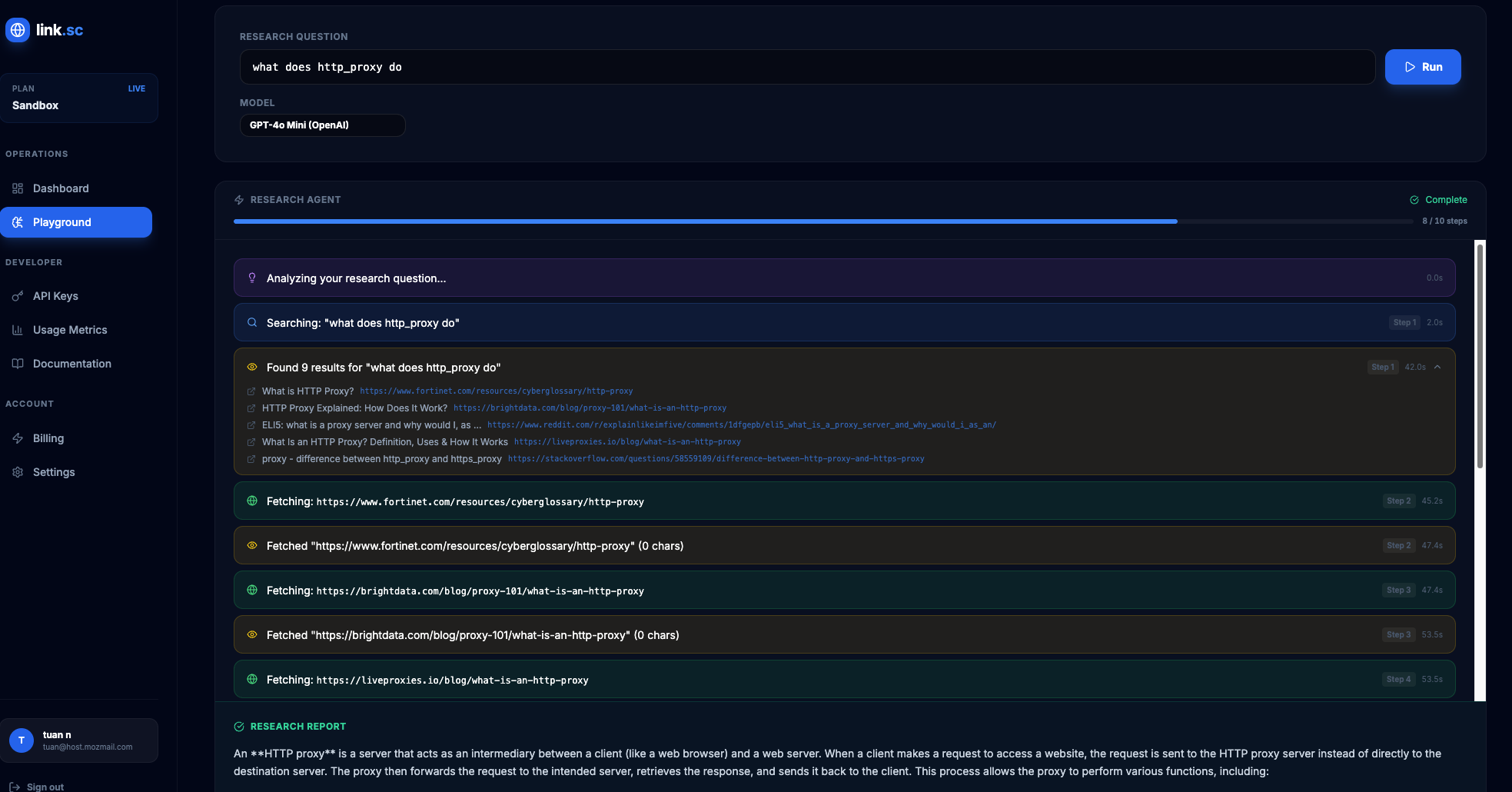 The link.sc Research Agent — a fully transparent AI search session showing every query, fetch, and reasoning step.
You see:
- The exact queries it decides to search for
- The search results returned for each query
- Which pages it chooses to fetch and read
- Its reasoning about what information is relevant
- How it decides whether it needs to search again or has enough information
This is not a black box. It is a glass box. You can watch the AI's search strategy unfold step by step.
From an API perspective, you connect to the SSE stream and receive events like:
event: tool_call
data: {"tool": "search", "query": "project management software remote teams 2026"}

event: tool_result
data: {"tool": "search", "results": [...]}

event: tool_call
data: {"tool": "fetch", "url": "https://example.com/pm-tools-review"}

event: reasoning
data: {"content": "The search results show several comparisons but lack pricing data. I should search specifically for pricing..."}

event: tool_call
data: {"tool": "search", "query": "project management tools pricing comparison per seat 2026"}
Every decision, every query, every fetch, logged and visible. If you are trying to understand AI search behavior, watching an AI search transparently is infinitely more useful than trying to reverse-engineer a black box.
Practical Takeaways
Let me summarize what actually works, ranked by effort and usefulness:
Quick and easy (5 minutes): Install a Chrome extension to see ChatGPT's sub-queries. Good for casual curiosity, unreliable for serious work.
Medium effort (30 minutes): Use browser DevTools to monitor network requests. Works for ChatGPT, partially works for Perplexity, does not work for Google AI Overviews. Fragile and manual.
Serious monitoring (a few hours): Use a search API to simulate fan-out queries and compare results against AI citations. Scriptable and repeatable. Gives you a reasonable model of AI search behavior.
Full transparency (ongoing): Use a tool that shows you every search step in real time. This is the only approach that eliminates guesswork entirely.
The uncomfortable truth is that the major AI search tools are not designed to be transparent. They show you polished answers with a few source links and call it a day. If you need to actually understand the search behavior — for SEO, for competitive analysis, for building your own AI features — you have to either reverse-engineer it or use tools that are transparent by design.
I think the industry is slowly moving toward more transparency here, partly because regulators are pushing for it and partly because users are demanding it. But we are not there yet. In the meantime, the methods above will get you most of the way.
Skip the browser extensions and network tab hacking. link.sc's Research Agent shows you exactly how an AI searches the web — every query, every page, every decision, streamed live. Get your free API key.