 Photo by
 Here's something most SEO practitioners haven't internalized yet: when someone types "best project management tools" into ChatGPT, Perplexity, or any AI-powered search tool, that exact query almost never hits the web. Instead, the AI decomposes it into five, six, sometimes seven or more sub-queries before it ever looks at a single webpage.
I call this the fan-out pattern, and understanding it is the single most important thing you can do for AI search visibility right now.
What Actually Happens When You Ask AI a Question
Let's trace a real example. A user asks ChatGPT: "What are the best project management tools for my team?"
Behind the scenes, the model generates something like this:
- "project management software comparison 2026"
- "best free PM tools for small teams"
- "Asana vs Monday vs ClickUp features"
- "project management tools pricing tiers"
- "PM software for remote teams"
- "Jira alternatives for non-technical teams"
- "project management tool user reviews 2026"
Each of those sub-queries hits a search engine independently. The AI fetches results for each one, reads the top pages, synthesizes everything, and produces a single unified answer with citations.
This is fundamentally different from traditional search. In Google, one query returns one set of results. In AI search, one user question spawns a constellation of searches. Your content doesn't need to rank for the user's original question. It needs to rank for the sub-queries the AI actually runs.
Why This Changes Everything About Content Strategy
Traditional SEO trained us to target the head term. "Best project management tools" has 40,000 monthly searches, so you write a page targeting that exact phrase and try to outrank the competition.
But AI search doesn't care about your ranking for the head term. It cares about your ranking for the six or seven decomposed queries it actually executes. And here's the data that should make you pay attention: emerging research on AI search behavior shows that content ranking for these fan-out sub-queries is 161% more likely to be cited in AI-generated responses compared to content that only targets the primary keyword.
That number makes intuitive sense when you think about it. If your page shows up in results for three out of seven sub-queries, the AI sees you as a recurring, authoritative source. It's like getting three votes instead of one.
The Anatomy of a Fan-Out Query
Not all fan-out queries are created equal. AI models tend to decompose user questions into predictable categories:
| Sub-Query Type | Example | What It's Looking For |
|---|---|---|
| Comparison | "Asana vs Monday vs ClickUp" | Side-by-side feature analysis |
| Category exploration | "PM tools for small teams" | Filtered recommendations |
| Pricing/specs | "project management software pricing 2026" | Concrete data points |
| Use case specific | "PM software for remote teams" | Contextual recommendations |
| Reviews/sentiment | "Monday.com user reviews" | Social proof and real opinions |
| Alternatives | "Jira alternatives for non-technical teams" | Options for specific pain points |
| Definitional | "what is project management software" | Foundational context |
The pattern is consistent. The AI is basically doing what a thorough human researcher would do: approaching the question from multiple angles, gathering diverse perspectives, then synthesizing.
Your job is to be the source that shows up across multiple angles.
The Answer-First Content Structure
Here's a structural change that has an outsized impact: put your answer in the first paragraph.
Content that leads with a clear, direct answer gets 67% more AI citations than content that buries the answer after a lengthy introduction. This isn't surprising when you consider how AI processes content. It's reading hundreds of pages across multiple sub-queries under time and token constraints. Content that delivers value immediately gets weighted more heavily than content that makes the AI dig for the answer.
Compare these two approaches:
Typical blog intro (low citation rate):
"Project management is a critical function for any modern business. In today's fast-paced environment, having the right tools can make or break your team's productivity. In this comprehensive guide, we'll explore..."
Answer-first intro (high citation rate):
"The best project management tools in 2026 are Asana (best for workflow automation), Monday.com (best for visual project tracking), and ClickUp (best free tier). Here's how they compare across pricing, features, and team size."
The second version gives the AI exactly what it needs in the first two sentences. Everything that follows is supporting evidence and detail.
This doesn't mean your content should be shallow. It means you lead with the conclusion and then substantiate it. Think of it as the inverted pyramid that journalism has used for a century -- it works for AI consumption for the same reason it works for busy human readers.
Structured Data Wins: Tables, Lists, and FAQs
Another clear signal from the data: structured content formats get 42% more citations than equivalent information presented as prose paragraphs.
Tables, bulleted lists, numbered steps, and FAQ sections are all significantly more likely to be cited than the same information written as flowing paragraphs. The reason is mechanical. AI models are pattern-matching machines. A well-formatted comparison table is trivially easy for an AI to parse, extract facts from, and cite. A wall of text describing the same comparison requires the AI to do more work to extract the same information.
Practical implications:
- Comparison pages should always include a summary table at the top
- "Best of" lists should use consistent formatting: tool name, one-line summary, key stats
- How-to content should use numbered steps, not prose
- FAQ sections should use actual Q&A format with clear question headings
Here's what a citation-optimized comparison looks like:
| Tool | Best For | Starting Price | Free Tier | Team Size |
|---|---|---|---|---|
| Asana | Workflow automation | $10.99/user/mo | Yes (15 users) | 5-500 |
| Monday.com | Visual tracking | $9/user/mo | Yes (2 users) | 3-200 |
| ClickUp | All-in-one features | $7/user/mo | Yes (unlimited) | 1-1000 |
| Linear | Engineering teams | $8/user/mo | Yes (250 issues) | 5-200 |
That table is AI citation bait in the best sense. It's dense, factual, structured, and easy to extract from.
The Fan-Out Query Mapping Framework
Here's the practical framework I use to optimize content for AI citation. I call it Fan-Out Query Mapping, and it works for any topic.
Step 1: Identify Your Target Topic
Start with the broad question your audience asks. Example: "best CRM software for startups."
Step 2: Brainstorm the Sub-Queries
Put yourself in the AI's shoes. If you had to research this topic thoroughly, what specific searches would you run? Aim for 7-10:
- "CRM software comparison 2026"
- "best free CRM for startups"
- "HubSpot vs Salesforce vs Pipedrive for small business"
- "CRM pricing for early-stage startups"
- "CRM with email integration"
- "easiest CRM to set up"
- "CRM for sales teams under 10 people"
- "CRM software reviews from startup founders"
Step 3: Validate with Real Data
This is where guessing stops and data begins. Use link.sc's Search API to actually run these sub-queries and see what currently ranks. Better yet, use the link.sc Research Agent -- it shows you in real-time exactly what queries an LLM generates for any question. Instead of guessing what the fan-out looks like, you can watch it happen.
When I run "best CRM for startups" through the Research Agent, I can see every sub-query it generates, every source it visits, and every piece of content it ultimately cites. That's not a guess about the fan-out pattern. That's the actual pattern.
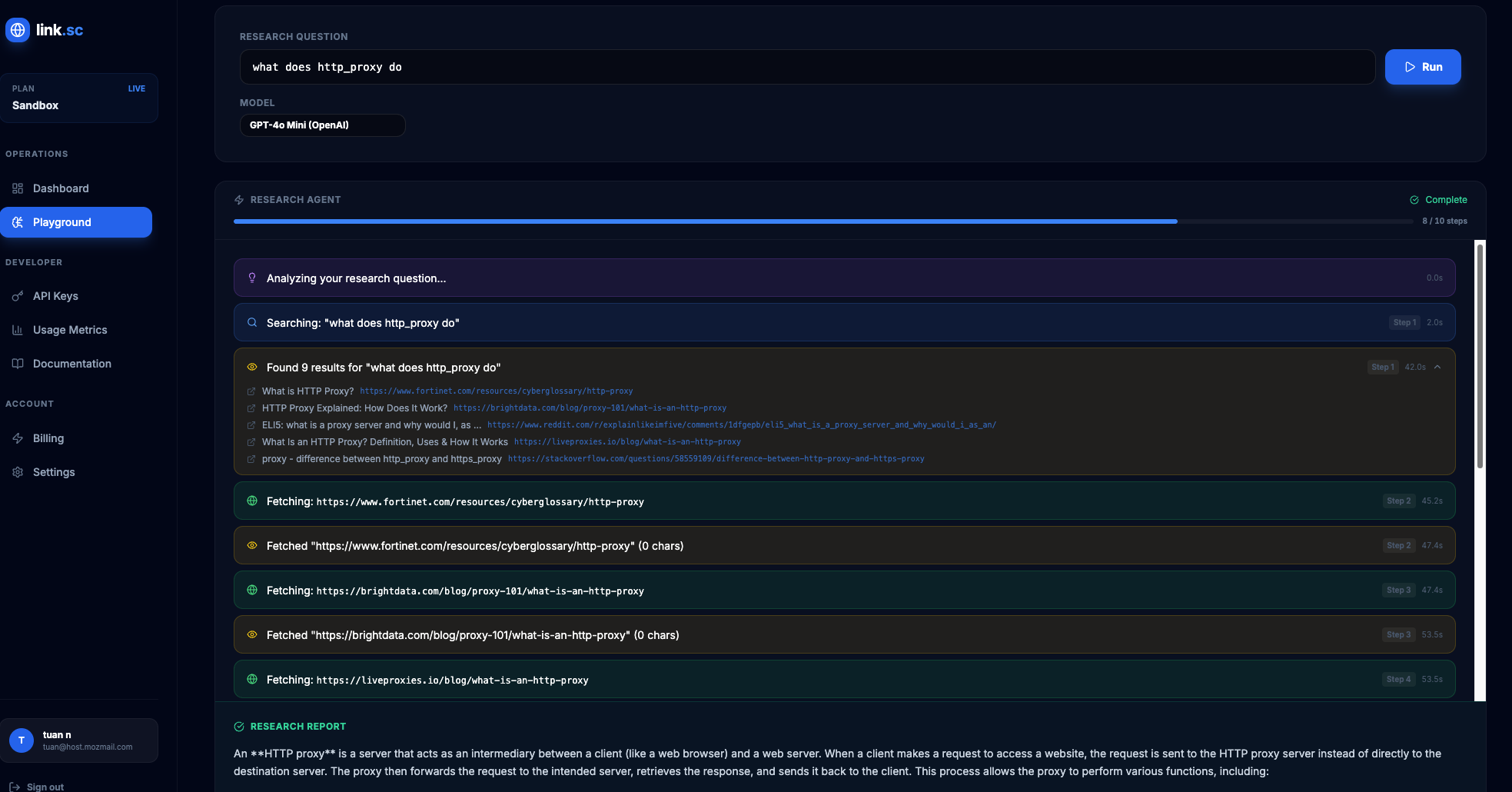 The link.sc Research Agent shows the exact fan-out queries an LLM generates — watch the decomposition happen live.
Step 4: Audit Your Content Against the Sub-Queries
For each sub-query, ask: does my content answer this? Would it show up in search results for this specific query? If the answer is no for more than half the sub-queries, you have a content gap problem.
Step 5: Create or Restructure Content
You have two options:
- Single comprehensive page: Create one authoritative page that answers all or most of the sub-queries, using clear H2/H3 sections for each
- Content cluster: Create multiple interlinked pages, each targeting a specific sub-query, with a pillar page that ties them together
Both approaches work. The content cluster approach tends to perform better for competitive topics because each page can go deeper on its specific sub-query.
Step 6: Optimize Internal Linking
This is the piece most people skip, and it matters more for AI citation than you might think. Internal links between related content help AI understand your authority on a topic cluster. If your CRM comparison page links to your detailed HubSpot review, which links to your CRM implementation guide, which links back to the comparison -- that's a signal to AI that you have comprehensive coverage of this space.
Think of internal links as telling AI: "I didn't just write one post about this. I have deep, interconnected knowledge across the entire topic."
Long-Tail Keywords Matter More Than Ever
Traditional SEO already knew that long-tail keywords were valuable. But AI search amplifies their importance by an order of magnitude.
Here's why: AI fan-out sub-queries are almost always more specific than the user's original question. The user asks "best project management tools." The AI searches for "project management software for remote teams under 50 people." That's a long-tail query.
If your content targets these specific, nuanced queries, you're directly in the path of AI search. Some practical long-tail strategies:
- Create content for specific use cases: "project management for marketing agencies" rather than just "project management tools"
- Address specific comparisons: "Asana vs Monday for creative teams" rather than just "Asana vs Monday"
- Target specific constraints: "free project management tools with Gantt charts" rather than just "free PM tools"
- Answer specific objections: "is Monday.com worth it for a 5-person team" rather than just "Monday.com review"
Each of these long-tail pieces becomes a potential citation source for AI fan-out queries.
Monitoring Your AI Citation Performance
Optimizing for fan-out queries is only useful if you can measure whether it's working. Here's what to track:
- Run your target queries through AI tools monthly and note whether you're cited
- Use the link.sc Research Agent to see which of your pages appear in AI research flows
- Track referral traffic from AI sources (Perplexity, ChatGPT browse, etc.)
- Monitor your search rankings for the sub-queries, not just the head term
The feedback loop matters. As AI search evolves, the fan-out patterns will shift. What the AI decomposes "best CRM software" into today might be different six months from now. Regular monitoring lets you adapt.
Putting It All Together
The shift from traditional search to AI-powered search isn't just a change in technology. It's a change in the fundamental unit of competition. You're not competing for rankings on a single query anymore. You're competing for citations across a fan-out of sub-queries.
The content that wins this game is:
- Answer-first -- lead with the conclusion
- Structured -- tables, lists, FAQs over prose
- Comprehensive -- cover multiple sub-query angles
- Specific -- target long-tail variations
- Interconnected -- strong internal linking across topic clusters
- Validated -- built on actual fan-out data, not guesses
This isn't theoretical. These patterns are showing up consistently in the data right now. The teams that adapt their content strategy to match how AI actually searches -- not how humans search -- are going to own an outsized share of AI citations.
And honestly, this is better content strategy regardless of AI. Answer-first, well-structured, comprehensive content is just good content. The fan-out query framework just gives you a more precise way to plan what to write and how to structure it.
Want to see exactly what sub-queries AI generates for your topic? Try the link.sc Research Agent -- it shows every search query, every source visited, in real-time. Get started free.